Cloud Run GPUs Are Generally Available: Run AI Workloads with Pay-per-Second and Scale to Zero
NVIDIA GPU support on Cloud Run is GA. Pay per second, scale to zero, sub-5s startup, and L4 GPUs without quota requests — official Google Cloud guide.
Cloud Run Just Got a GPU Runtime
Cloud Run is Google Cloud’s serverless runtime for containers. As of June 2025, NVIDIA GPU support on Cloud Run is generally available (GA). You can run inference, batch jobs, and other GPU workloads with the same operational model: no cluster to manage, pay for what you use, and scale to zero when idle.
This post summarizes the official announcement and docs: Cloud Run GPUs, now GA (Google Cloud Blog, Serverless). All links are to Google sources only.
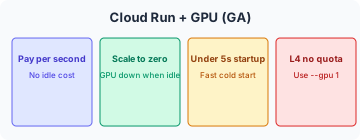
What You Get with Cloud Run + GPUs
| Benefit | What it means |
|---|---|
| Pay-per-second billing | Charged only for GPU (and CPU) time consumed, down to the second. |
| Scale to zero | Instances scale down to zero when there are no requests; no idle GPU cost. |
| Fast startup | From zero to an instance with GPU and drivers in under 5 seconds. |
| Streaming | HTTP and WebSocket streaming supported — e.g. stream LLM tokens as they’re generated. |
| L4 GPUs, no quota request | NVIDIA L4 GPUs are available without a separate quota request. |
| SLA | Same Cloud Run SLA as the rest of the product. |
Quick Deploy: Ollama on Cloud Run with One GPU
From the official blog, you can run Ollama (open models) on Cloud Run with one GPU:
gcloud run deploy my-global-service \
  --image ollama/ollama --port 11434 \
  --gpu 1 \
  --regions us-central1,europe-west1,asia-southeast1
This deploys a single service with one GPU across three regions. Use the Cloud Run locations guide for GPU-enabled regions.
GPU Regions (Official List)
At GA, Cloud Run GPUs were available in:
- us-central1 (Iowa, USA)
- europe-west1 (Belgium)
- europe-west4 (Netherlands)
- asia-southeast1 (Singapore)
- asia-south1 (Mumbai, India)
Check the latest: Cloud Run locations — GPU.
Multi-Region and High Availability
- Zonal redundancy is on by default — helps withstand a single-zone failure.
- You can turn it off for lower cost and best-effort failover; see Cloud Run pricing.
- The same blog shows deploying one service to multiple regions with a single command for lower latency and higher availability.
Cloud Run Jobs with GPUs
GPUs aren’t only for request-driven services. Cloud Run jobs can use GPUs for:
- Model fine-tuning — Run a job, process data, scale to zero when done.
- Batch inference — Images, text, recommendations at scale.
- Batch media processing — Transcode, thumbnails, image pipelines.
At the time of the GA post, GPUs on Cloud Run jobs were in private preview; sign-up was via a form linked in the blog. Check the Cloud Run jobs docs for current status.
See It in Action (Official Demo)
Google Cloud Next ’25 featured a live demo of scaling from 0 to 100 NVIDIA GPUs in about four minutes for a Stable Diffusion–style workload:
- Video: Load testing a Stable Diffusion service on Cloud Run GPUs (YouTube)
- Wayfair quote (Next ’25): L4 GPUs + fast autoscaling led to roughly 85% cost reduction; see the same video at ~2496s.
How to Enable GPUs in Your Service
- Console: When creating or editing a Cloud Run service, enable the GPU option and choose the type (e.g. L4).
- gcloud: Add
--gpu 1(or the desired count) to yourgcloud run deploycommand. - Docs: Configuring GPUs for Cloud Run.
Best Practices and Next Steps
- Optimize model loading — Cold starts include loading the model; see Best practices for GPU on Cloud Run.
- Quickstart: Run Gemma with Ollama on Cloud Run (tutorial).
- Pricing: Cloud Run pricing — includes GPU pricing details.
References (Google sources only)
- Cloud Run GPUs, now GA — Google Cloud Blog, Serverless, June 2, 2025
- Cloud Run — Configuring GPUs — Google Cloud Documentation
- Cloud Run — GPU quickstart (Gemma + Ollama) — Google Cloud Documentation
- Cloud Run SLA — Google Cloud
- Cloud Run pricing — Google Cloud
- Cloud Run locations (GPU) — Google Cloud Documentation