From Code to Cloud: Three Ways to Deploy Your AI Agent on Google Cloud
Vertex AI Agent Engine, Cloud Run, or GKE — choose the right path for your AI agent. Official labs and architecture from the Production-Ready AI learning path.
You Built an AI Agent — Now Ship It
Once your AI agent works locally, the next step is production: secure, scalable, and reliable. On Google Cloud there are three main deployment paths, each with a different trade-off between simplicity and control.
This post is based on the official Google Cloud blog and learning path: From Code to Cloud: Three Labs for Deploying Your AI Agent (December 2025). All links are to Google sources only. These labs are part of the Production-Ready AI with Google Cloud curriculum.
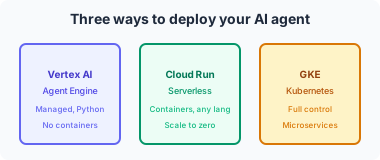
The Three Deployment Paths (Overview)
| Path | Best for | You manage | Google manages |
|---|---|---|---|
| Vertex AI Agent Engine | Fastest path, Python agents | Agent logic, tools, config | Runtime, scaling, memory, tool invocation |
| Cloud Run | Containers, any language, CI/CD | Container image, config | Scaling, networking, scale-to-zero |
| GKE | Full control, multi-service clusters | Cluster, manifests, scaling policy | Control plane, node lifecycle |
1. Vertex AI Agent Engine — Managed and Python-Optimized
Use when: You want the simplest path to production and your agent is (or can be) implemented in Python.
- No web server or container to manage — you define the agent (logic, tools, instructions), and the platform runs it.
- Execution, memory, and tool invocation are handled by the service.
- Opinionated — optimized for Python and the supported agent framework (e.g. ADK).
Official resource: Vertex AI Agent Engine (Agent Builder) — product overview and docs.
2. Cloud Run — Serverless Containers
Use when: You want containers without managing clusters, need multiple languages or custom runtimes, or want to plug into existing CI/CD (e.g. Cloud Build, GitOps).
- Deploy your agent as a container image.
- Automatic scaling (including to zero when idle).
- You own the Dockerfile and app code; Cloud Run handles traffic, HTTPS, and scaling.
Official resource: Cloud Run — documentation and quickstarts.
3. Google Kubernetes Engine (GKE) — Full Orchestration
Use when: You need precise control over environment, sidecars, resource limits, or you run the agent as one microservice among many in a larger system.
- Agent runs as a workload in a Kubernetes cluster.
- You manage (or automate) Deployments, Services, Ingress, and optionally autoscaling.
- Fits into a broader GKE-based architecture (e.g. with other services, GPU nodes, custom networking).
Official resource: GKE — Deploy an app to a cluster.
Choosing the Right Path
Google’s Developer Relations team published a detailed comparison for ADK (Agent Development Kit) agents:
- Article: Choosing the Right Deployment Path for Your Google ADK Agents (Medium, Google Cloud - Community)
- Use it to map your constraints (language, ops model, existing pipelines) to one of the three options above.
Hands-On: The Official Labs
The “Deploying Agents” module in the Production-Ready AI path includes three labs — one per path:
- Vertex AI Agent Engine — Deploy an agent to the managed runtime.
- Cloud Run — Build a container and deploy to Cloud Run.
- GKE — Deploy the same agent as a microservice in a GKE cluster.
Start here: From Code to Cloud: Three Labs for Deploying Your AI Agent
From that post you can reach the learning path hub and the individual lab instructions.
How This Maps to the Professional Cloud Developer Exam
- Deploy applications — Cloud Run and GKE are both in scope.
- Integrate with GCP services — Vertex AI Agent Engine and Vertex AI APIs.
- Design scalable, reliable applications — Choosing between serverless vs. orchestrated is a core design decision.
Doing all three labs gives you hands-on experience with the deployment options the exam expects you to understand.
References (Google sources only)
- From Code to Cloud: Three Labs for Deploying Your AI Agent — Google Cloud Blog, Developers & Practitioners, Dec 19, 2025
- Production-Ready AI with Google Cloud Learning Path — Google Cloud Blog
- Vertex AI Agent Engine (Agent Builder) — Google Cloud
- Cloud Run — Google Cloud
- GKE — Deploy an app to a cluster — Google Cloud Documentation
- Choosing the Right Deployment Path for Your Google ADK Agents — Google Cloud - Community (Medium)