Production-Ready AI with Google Cloud: The Official Learning Path for Developers
Bridge the prototype-to-production gap with Google Cloud’s free learning path: Vertex AI, GKE, Cloud Run, security, and evaluation — all from official sources.
Why Google Built This Learning Path
Building a generative AI prototype is one thing. Moving it to a secure, scalable, and observable production system is where many projects stall. Google Cloud calls this the prototype-to-production gap — and they built an internal playbook to solve it, then turned it into a free, public curriculum for developers.
This post summarizes the Production-Ready AI with Google Cloud Learning Path using only official Google Cloud sources. If you’re aiming for the Google Cloud Professional Cloud Developer certification or the Expert Developer track, this path aligns directly with deploying and securing AI on GCP.
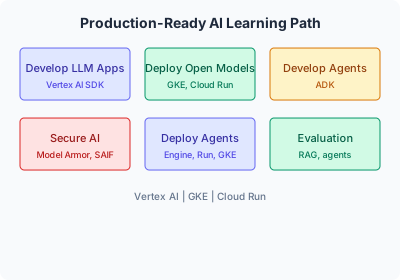
What the Learning Path Covers
The curriculum is organized into modules. Each one links to official blog posts, docs, or codelabs.
| Module | What you learn | Official summary / resource |
|---|---|---|
| Developing apps that use LLMs | Vertex AI SDK, first AI app | Your First AI Application is Easier Than You Think |
| Deploying open models | Serve and scale open models on GKE, Cloud Run, Vertex AI | Hands-on with Gemma 3 on Google Cloud |
| Developing agents | Build agents that reason, plan, and use tools (ADK) | Build Your First ADK Agent Workforce |
| Securing AI applications | Security for infrastructure, data, and AI endpoints | Building a Production-Ready AI Security Foundation |
| Deploying agents | Agent Engine, Cloud Run, GKE deployment options | From Code to Cloud: Three Labs for Deploying Your AI Agent |
| Evaluation | Evaluate LLM outputs, agents, and RAG systems | Master Generative AI Evaluation |
| Agent production patterns | Agentic RAG, MCP, A2A | Building Connected Agents with MCP and A2A |
| Data foundations & RAG | Vector stores, embeddings, advanced RAG | Official module (AlloyDB, Cloud SQL) — see learning path hub |
Core Technologies (All Official GCP)
The path is built around these products — all part of the Professional Cloud Developer scope:
- Vertex AI — Managed ML platform; Gemini models, endpoints, and agent runtime.
- Google Kubernetes Engine (GKE) — Run containers and scale open models.
- Cloud Run — Serverless containers; scale to zero, pay per request.
- Vertex AI Agent Engine — Managed environment for deploying AI agents.
How to Use This for the Expert Dev Badge
- Follow the path in order — Start with “Developing apps that use LLMs,” then deployment, then security and evaluation.
- Do the hands-on labs — The “From Code to Cloud” labs (Agent Engine, Cloud Run, GKE) map to real deployment scenarios on the exam.
- Use only Google sources — Stick to cloud.google.com, developers.google.com, and linked blog posts / codelabs for your own notes and demos.
- Share progress — Google encourages the hashtag #ProductionReadyAI when you post or present.
Where to Start and Stay Updated
- Central hub (start here): Production-Ready AI with Google Cloud Learning Path
- Transform with Google Cloud: cloud.google.com/transform
- Feedback / suggest topics: Form linked at the bottom of the learning path blog post.
References (Google sources only)
- Production-Ready AI with Google Cloud Learning Path — Google Cloud Blog, Developers & Practitioners
- Vertex AI — Google Cloud Documentation
- Cloud Run — Google Cloud Documentation
- GKE — Google Cloud Documentation
- Professional Cloud Developer certification — Google Cloud Learn