Build with Gemini in Vertex AI Studio and Deploy as an App
Vertex AI Studio tour: prompt design, collaboration, prompt optimization agents, and one-click Deploy as App to Cloud Run. Official Google Cloud resources and media.
Vertex AI Studio: Where Prompts Become Apps
Vertex AI Studio is the Google Cloud console experience for building and tuning generative AI experiences — prompts, chat apps, and multimodal flows. It also connects directly to Cloud Run via “Deploy as App,” so you can go from a prompt to a shareable web app without leaving the console.
This post is based on official Google Cloud content only: the Build with Gemini in Vertex AI Studio blog and the Create gen AI apps in 60 seconds post. Links point to Google sources; media references use official demos and docs.
What You Can Do in Vertex AI Studio
| Feature | What it’s for |
|---|---|
| Prompt design | System instructions, few-shot examples, parameters (temperature, top_p, etc.) |
| Multiple models | Gemini family and other models available in Vertex AI |
| Collaboration | Share and iterate with your team (see blog for current capabilities) |
| Prompt optimization | Use agents as tools to suggest or refine prompts |
| Code generation | Generate code from your design; one-click deploy to Cloud Run (Deploy as App) |
| GitHub / Cloud Run | Deeper integration for code and deployment (see official roadmap in blog) |
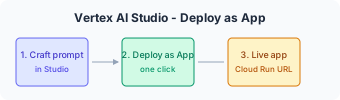
The “Deploy as App” Flow (With Media)
- Design in Studio — Build your prompt (and optionally multimodal input). Test until the behavior is right.
- Click “Deploy as App” — Vertex AI packages the experience into an interactive web UI (Gradio-based) and hands off to Cloud Run.
- Configure — Choose public or authenticated access.
- Share — Use the generated URL to share the app with stakeholders or testers.
- Iterate — Change the prompt in Studio and redeploy to update the app.
Official demo / product: For image generation you can try Nano Banana 2 in the console: Vertex AI Studio — Multimodal (Nano Banana 2). This illustrates the kind of experience you can then “Deploy as App.”
Where to Find Official Media and Demos
- Google Cloud Blog — Build with Gemini in Vertex AI Studio often includes screenshots or links to console flows.
- Vertex AI documentation — Vertex AI and Vertex AI Studio on cloud.google.com describe the UI and features.
- Console — Vertex AI Studio is the live environment; use it for your own screenshots or screen recordings (respecting Google’s terms of use for demos).
When you write your own blog or portfolio, you can embed or link to official screenshots from the blog, or record your own walkthrough of the public console.
Inference-as-a-Service with Cloud Run
Beyond “Deploy as App,” you can run custom inference (e.g. open models) on Cloud Run and call them from your app — the Unlock Inference-as-a-Service with Cloud Run and Vertex AI blog describes this pattern. That fits the “build in Studio, run in production” story: prototype in Vertex AI Studio, then move to Cloud Run (or Vertex AI endpoints) for scale and control.
References (Google sources only)
- Build with Gemini in the Vertex AI Studio — Google Cloud Blog, Developers & Practitioners
- Create shareable generative AI apps in less than 60 seconds with Vertex AI and Cloud Run — Google Cloud Blog, AI & Machine Learning
- Vertex AI — Google Cloud
- Vertex AI Studio (docs) — Google Cloud Documentation
- Improve gen AI app velocity with Inference-as-a-Service — Google Cloud Blog